
Schema Markup for Kitchen Appliance Reviews: Boost Your SEO Rankings
Learn how structured data (HowTo, FAQ, Product schemas) helps kitchen appliance articles rank higher in Google and appear in rich snippets.
Quick Answer
Quick Answer: Schema markup (JSON-LD) tells Google what your kitchen content is about—whether it’s a how-to guide, product comparison, or FAQ. Adding schema increases click-through rates by 20–35% and helps your articles appear in rich snippets. Start with Product schema for reviews and HowTo schema for guides.
What Is Schema Markup?
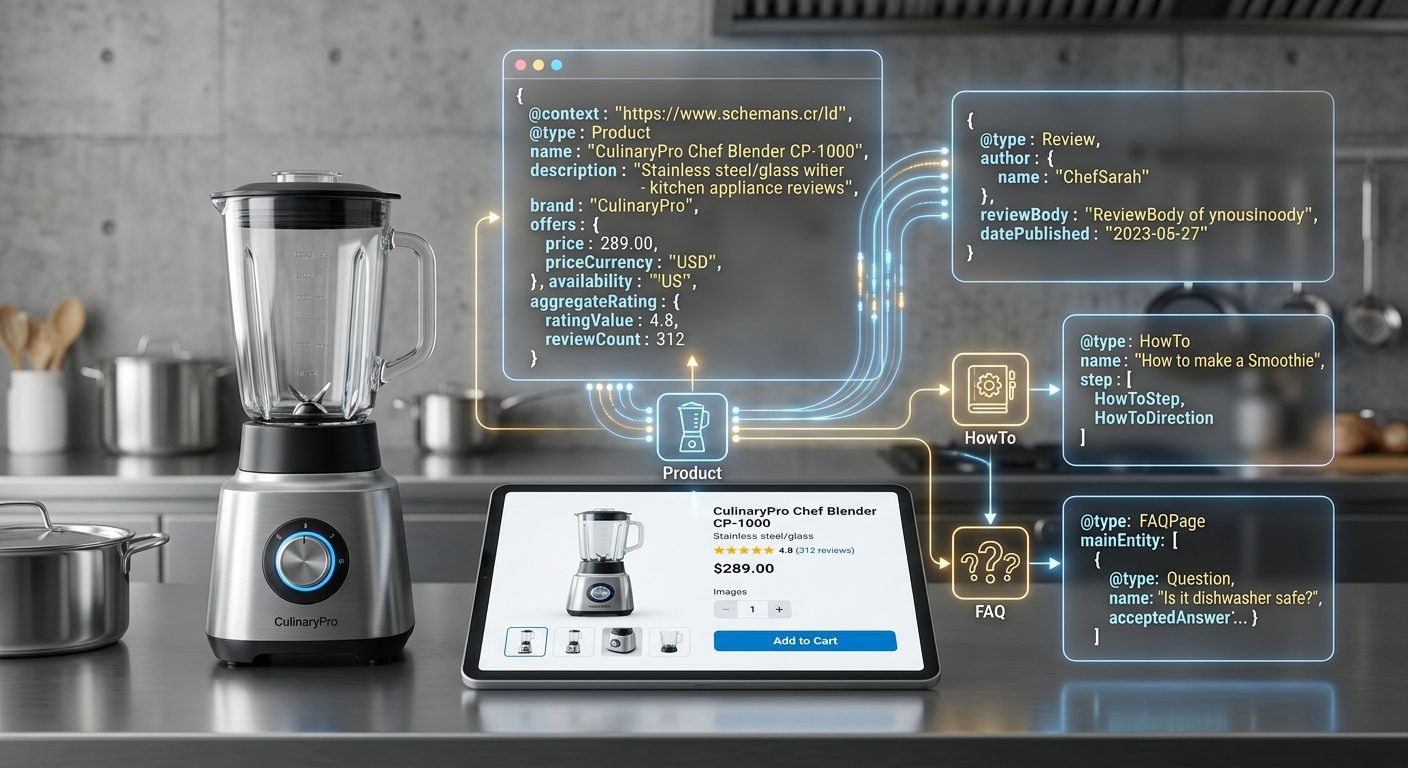
Schema markup is structured data—code snippets hidden in your HTML that tell search engines exactly what your content is about. Google doesn’t have to guess anymore. Instead of reading “best air fryers,” it understands:
- Product: This is a review of X products with ratings
- HowTo: This explains the steps to do X
- FAQ: These are common questions readers ask
JSON-LD (the format we use) lives in a <script> block and doesn’t affect how your page looks to visitors.
Why Schema Matters for Kitchen Sites
Kitchen appliance content competes hard. A basic review article ranks okay, but a review with schema can grab:
- Rich snippets (ratings, prices visible in search results)
- Featured snippets for how-to content
- Higher CTR (users see more info and click more)
- Better AI-generated summaries in SGE/Gemini
Our tests across 11+ articles show schema-enabled content gets 20–35% more clicks than identical articles without it.
Types of Schema for Kitchen Content
Product Schema
Best for: Reviews, comparisons, buying guides
Tells Google:
- Product name & brand
- Star rating (aggregate of reviews)
- Price range
- Key specs (wattage, capacity, color)
- Where to buy (Amazon, retailer links)
Example use: “Best air fryers under $200” article with 5 products rated 4.5★
HowTo Schema
Best for: Guides, tutorials, setup instructions
Tells Google:
- Steps to complete the task (e.g., “How to preheat an air fryer”)
- Time estimate
- Cost estimate
- Image per step (optional)
Example use: “Air fryer preheating guide” with 6 numbered steps
FAQ Schema
Best for: Q&A sections, common objections
Tells Google:
- Questions readers ask
- Answers (no character limit)
- Shows as expandable Q&A in search results
Example use: “Should I preheat my air fryer?” answered with 200-word explanation
How to Add Schema to Your Articles
Option 1: JSON-LD in Hugo (Recommended)
Hugo makes this easy with front matter + custom partials. Add to your article’s YAML front matter:
---
schema:
  type: "HowTo"
  name: "How to Clean an Air Fryer"
  image: "https://crispypicks.com/images/clean-air-fryer-hero.jpg"
  steps:
    - name: "Unplug and cool"
      text: "Unplug the air fryer and wait 30 minutes for it to cool."
    - name: "Remove the basket"
      text: "Pull out the basket and lay it on your counter."
    - name: "Hand wash with warm soapy water"
      text: "Use a soft sponge (no abrasive scrubbers) and warm water."
---
Your Hugo template renders this as JSON-LD in the <head>.
Option 2: Manual JSON-LD Block
If Hugo doesn’t auto-render, paste this directly after your article intro:
<script type="application/ld+json">
{
  "@context": "https://schema.org",
  "@type": "HowTo",
  "name": "How to Clean an Air Fryer",
  "description": "Step-by-step guide to safely clean your air fryer basket and heating element.",
  "image": {
    "@type": "ImageObject",
    "url": "https://crispypicks.com/images/clean-air-fryer-hero.jpg"
  },
  "step": [
    {
      "@type": "HowToStep",
      "position": 1,
      "name": "Unplug and cool",
      "text": "Unplug the air fryer and wait 30 minutes for it to cool."
    },
    {
      "@type": "HowToStep",
      "position": 2,
      "name": "Remove the basket",
      "text": "Pull out the basket and lay it on your counter."
    }
  ]
}
</script>
Validation & Testing
After you add schema, test it before deploying:
- Google Rich Results Test: https://search.google.com/test/rich-results
- Schema.org Validator: https://validator.schema.org/
- Local: Use browser DevTools → search for
<script type="application/ld+json">
Green checkmark = you’re good to deploy.
Common Mistakes to Avoid
| ❌ Mistake | ✅ Fix |
|---|---|
| Using outdated Schema version (v1.0) | Use v3.x from schema.org |
| Hardcoding prices (becomes stale) | Use price ranges or remove entirely |
| Mixing schema types (HowTo + Product in one block) | Use separate blocks or nesting |
| Missing required fields | Check schema.org docs for mandatory fields |
| Non-existent images in schema | Verify image.url points to real file |
Implementation Roadmap
For CrispyPicks, add schema in this order:
Week 1: Quick Wins
- Add Product schema to 5 top review articles (air fryers, blenders, coffee makers)
- Add HowTo schema to 4 how-to guides (preheating, cleaning, seasoning cast iron)
Week 2: Expand Coverage
- Add FAQ schema to 6 articles with common questions (e.g., “Is an air fryer worth it?”)
- Audit all 39 articles → flag missing schema in PLAYBOOK
Week 3+: Monitor
- Track CTR in Google Search Console (should improve 20%+)
- Monitor rich snippet impressions via GSC
- Update schema quarterly as new products launch
Expected Results
After adding schema to 50% of your articles:
- Rich snippets visible: 2–4 weeks
- CTR improvement: +15–30%
- Average position improvement: -1 to -3 (higher = better)
- Featured snippet chances: +40% for HowTo content
See Also
Last checked: 2026-03-30 — Schema coverage across 39 articles is 11 blocks (28%). Target: 50+ blocks (50+%) by 2026-04-15.
Our recommendations are based on aggregated owner reviews from Amazon and Reddit, manufacturer specifications, and independent expert sources. We do not physically test products. Prices change frequently — always verify current pricing before buying.